
Logs: we now create a log for every machine automatically
A machine's log records every command: who ran it, when and how it ended. The records are kept for a year. You can leave a note on a command, and erase a password that got into one by mistake.
Why
The terminal shows what you are doing now. On a server, though, what often matters is something else: who restarted the service last night, what ran just before everything fell over, which command fixed the same thing last month. You used to piece this together from history and the server's own logs. Now tTerm records every command itself, and nobody can change that record.
Where it is
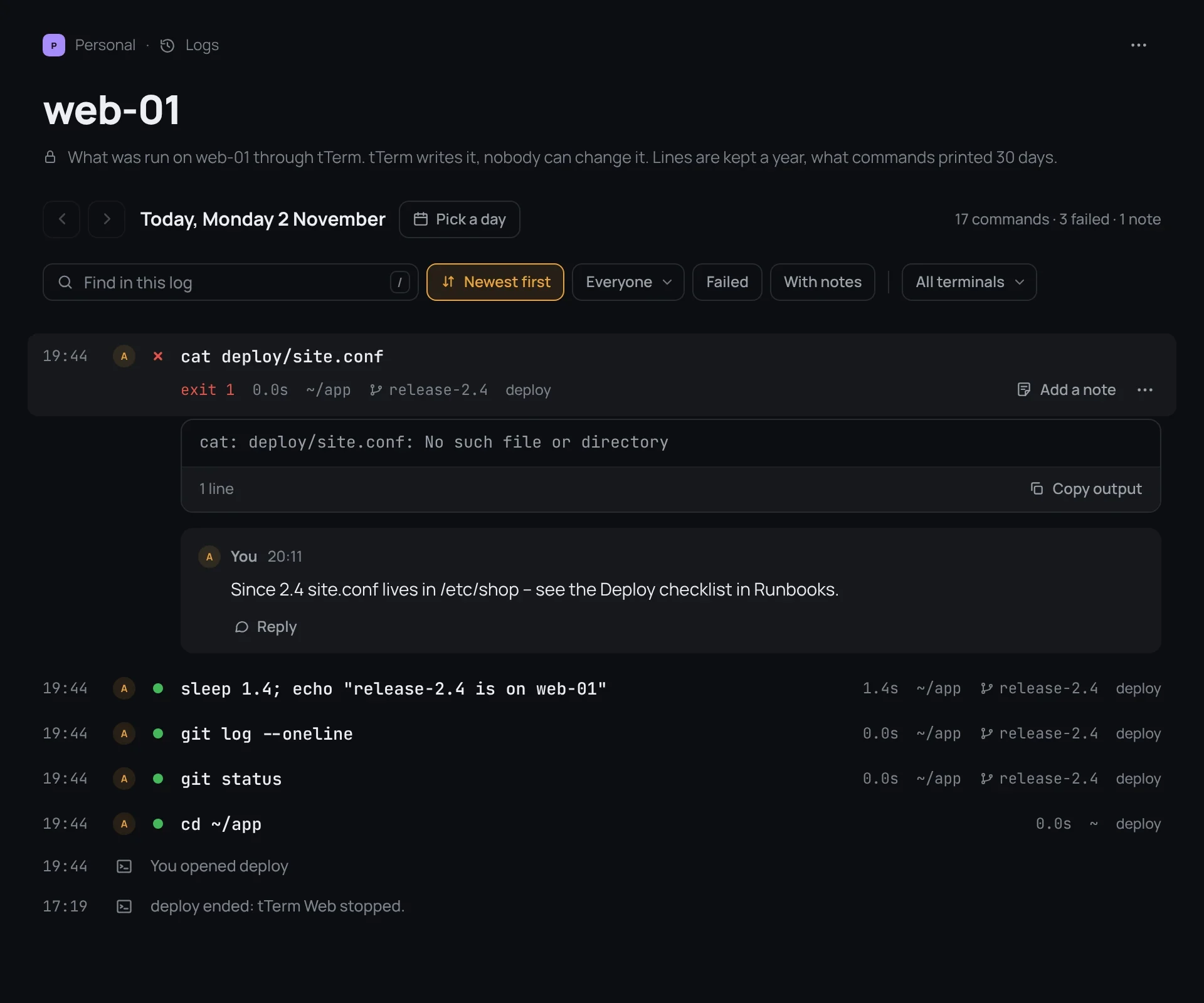
The log is among the project's notes, in the Logs folder marked “by tTerm”, one for each machine. Next to a machine you can see how many commands ran on it today. The log shows one day at a time, and new lines appear in it on their own as soon as a command ends.
What a line shows
Each command takes one line: the time, who ran it, the command itself, how long it took, the folder, the git branch and the terminal. A failed command has a cross and its exit code. A click opens the line in full: the command, its output and its notes. Between commands the log marks when terminals were opened and closed, and when a terminal ended on its own, it says why.
Notes on commands
You can leave a note under any command: why you ran it, what came of it, where the config moved. Write it in the log or right at the block in the terminal, and it shows in both places. Notes are not edited or deleted, they are replied to. That is why the log stays an honest history.
Search a whole year
Find in this log searches the whole year, both commands and notes. Filters leave only failed commands, commands with notes, or those of one person or one terminal. And ⌘K search now finds lines in the logs of all your machines too.
If a password got into a command
It happens: an export with a token, or a password right in the line. The project's owner erases it with Redact…. The words disappear from the log, the terminal's feed, search and the history of the input line. In their place stays who erased them, when and why. In the nightly copies of the database they last no more than two weeks longer.
How long it is kept
Log lines are kept for a year, and command output for 30 days. The log belongs to the machine: move it to another project, and the whole log moves with it.
When a terminal ends on its own
A terminal lives in tTerm Web, not in a browser tab, but sometimes it ends without you, for example when a new version of tTerm Web comes out. Now the tab says why it happened, and everything that ran stays in the log. The Open a new terminal button opens one in the same folder.
In tTerm for Mac the log comes with the next update. The details are in the docs, on the page A machine's log.